File:CannyEdgeDetection.png

Original file (767 × 695 pixels, file size: 652 KB, MIME type: image/png)
Summary
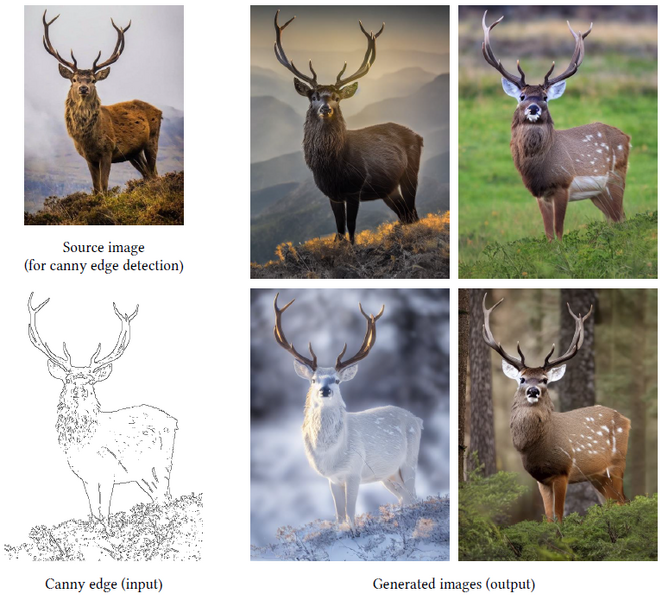
Figure 1: Control Stable Diffusion with Canny edge map. The canny edge map is input, and the source image is not used when we generate the images on the right. The outputs are achieved with a default prompt “a high-quality, detailed, and professional image”. This prompt is used in this paper as a default prompt that does not mention anything about the image contents and object names. Most of figures in this paper are high-resolution images and best viewed when zoomed in.
Lvmin Zhang, Maneesh Agrawala arXiv:2302.05543v1 [cs.CV] 10 Feb 2023
File history
Click on a date/time to view the file as it appeared at that time.
| Date/Time | Thumbnail | Dimensions | User | Comment | |
|---|---|---|---|---|---|
| current | 10:55, 22 August 2023 | | 767 × 695 (652 KB) | StableTiger3 (talk | contribs) | Figure 1: Control Stable Diffusion with Canny edge map. The canny edge map is input, and the source image is not used when we generate the images on the right. The outputs are achieved with a default prompt “a high-quality, detailed, and professional image”. This prompt is used in this paper as a default prompt that does not mention anything about the image contents and object names. Most of figures in this paper are high-resolution images and best viewed when zoomed in. Lvmin Zhang, Maneesh... |
You cannot overwrite this file.
File usage
The following page uses this file:
